8 best AI resume tailoring tools for the resume you already have.
Keep your experience. Change the emphasis. A practical comparison of what these tools edit, what you can download, and where the free plan ends.
Start with the job you need done
The short answer
Start with what you need for your next application, whether it’s a keyword check, help editing your existing resume, or a tailored copy in Word or PDF.
- Teal for repeated applications. Keep a master resume and organize versions by job. The free plan includes unlimited manual versions and PDF downloads, with a one-time allowance for AI writing.
- Jobscan for checking keyword gaps. Compare your resume with the job description to see which skills and keywords are missing. The free plan includes five scans per month.
- Rezi for conversational AI edits. Ask the Resume Agent to make changes for a specific job. The Agent guide lists one free prompt. Pro costs $29 a month and Lifetime costs $149 once.
- Tailr for editing an existing Word resume. If you like your layout, review suggestions beside the posting in Chrome, accept or skip each edit, and download an editable DOCX.
- Huntr for a free AI-tailored copy. Create up to two free job-specific versions and download them as Word or PDF files using Huntr’s templates.
Simplify+ can rewrite a full resume, a section or a single bullet as you apply. Kickresume lets you choose how much to rewrite. Resume Worded gives feedback on keywords and bullet wording.
At a glance
Compare the tools
Published plans reviewed in November.
| Tool | What it does | Output | Free access | Paid plans |
|---|---|---|---|---|
| Teal | Select relevant experience, match keywords and draft with AI. | PDF only, according to the export help page. | Unlimited manual versions + PDF export; one-time AI credits. | $13/7 days; $29/30 days; $79/90 days. |
| Jobscan | Match analysis plus accept/reject edits in AI Optimize. | DOCX; AI Optimize advertises layout preservation. | 5 scans/month; not 5 full AI rewrites. | $49.95/month; $89.95/3 months. |
| Rezi | Use the AI Resume Agent to target and refine a resume. | Builder supports PDF, DOCX and Google Drive exports. | 1 resume, 3 PDF downloads; Agent guide lists 1 free prompt. | $29/month or $149 Lifetime. |
| Huntr | Job-specific rewriting with editable suggestions and tracking. | PDF and DOCX; rebuilt layout, not your original template. | 2 tailored resumes + advertised free PDF/DOCX export; reset period not stated. | $40/month; $90/3 months; $160/6 months. |
| Resume Worded | Check job keywords; generate bullet suggestions with Magic Write. | Copy reviewed edits into your existing document. | Free keyword analysis; 2 Magic Write credits in our test. | $49/month; $99/quarter; $229/year. |
| Simplify | With Simplify+, rewrite a full resume, section or bullet for a target job. | PDF and DOCX from a separate editable builder version. | Manual import, editing and builder exports; AI tailoring requires Simplify+. | $19.99/week; $39.99/month; $89.99/3 months. |
| Kickresume | Generate a tailored copy with adjustable rewrite intensity. | PDF design; separate text-only export for editing. | First tailoring free; free basic-template downloads are a separate allowance. | €24/month; €54/quarter; €96/year. |
| Tailr | Review individual rewrites in a Chrome side panel. | DOCX; original layout retained in our one-file test. | 3 tailorings in our new account; reviewed DOCX downloaded free. | $9/month (Pro). |
The details that change the decision
Which one fits your workflow?
All eight address job-specific tailoring. Compare how they change an existing resume, which edits you control and what you can download.
Teal
Managing many versions from a master resume
Teal fits a search where the main challenge is keeping several versions organized. Start with a master resume, then select and reorder the experience that matters for each saved job.
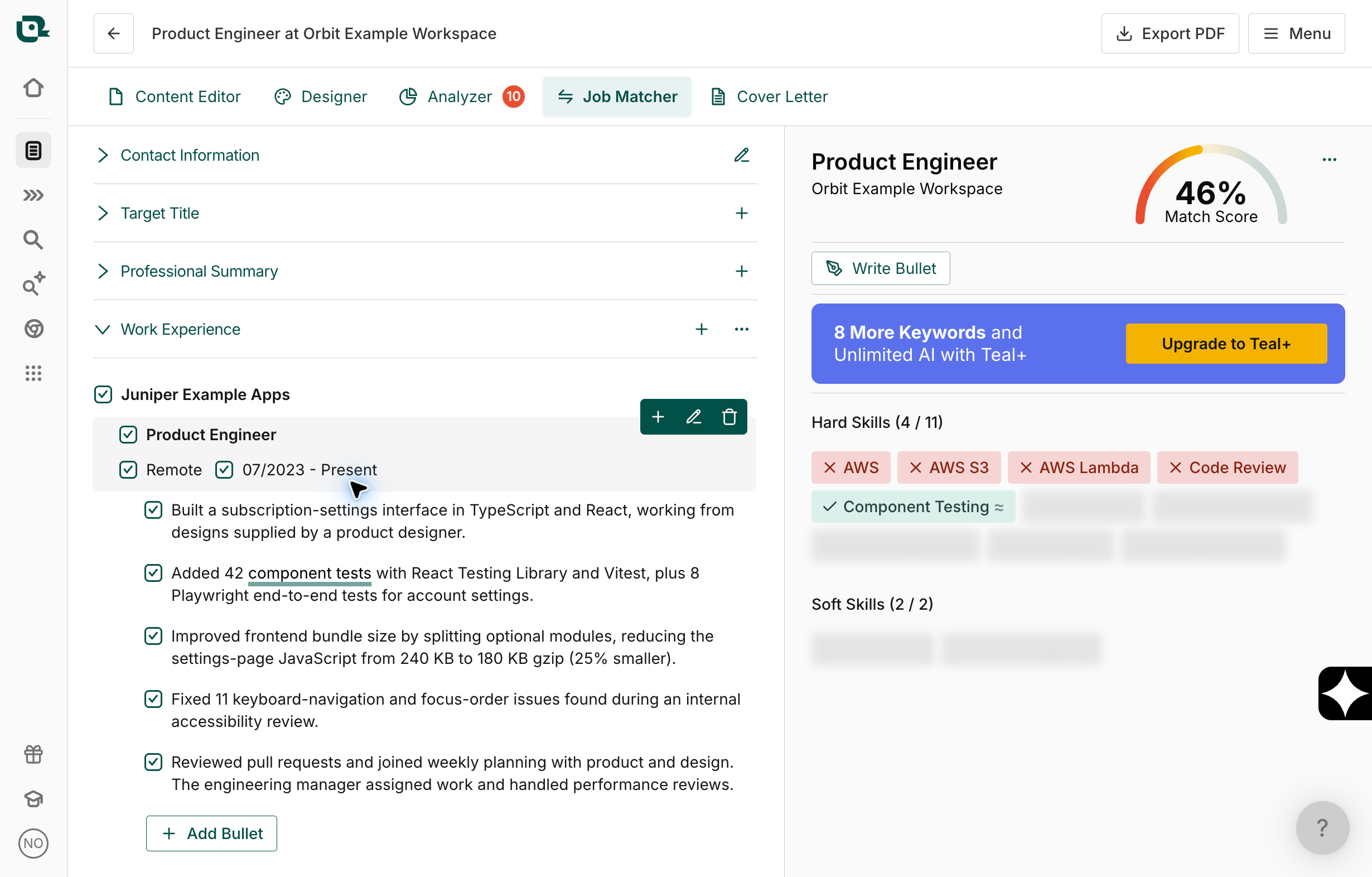
Teal’s documented tailoring process combines keyword matching, toggling existing bullets and AI-assisted writing. Free accounts can create, manually edit and export unlimited resume versions as PDFs, but see only the top five job-description keywords. Free AI allowances are one-time credits: five bullet generations, two summaries and two cover letters.
- Output
- PDF only, according to the export help page.
- Free limit
- Unlimited manual versions + PDF export; one-time AI credits.
The tradeoff. Unlimited resume versions are not unlimited AI rewrites. Our free account imported a Word resume, matched a job, generated bullet drafts and let us save a reviewed manual edit and download a PDF. Teal+ costs $13 every seven days, $29 every 30 days or $79 every 90 days. Export is PDF only, so choose another workflow if the employer requests Word.
See the free test and what we checked →
Jobscan
Checking alignment and reviewing suggested edits
Jobscan suits applicants who want to inspect gaps against a specific job description, then review suggested changes in AI Optimize.
AI Optimize proposes in-context edits, lets you accept or reject suggestions, and updates Jobscan’s Match Rate as you work. It also offers generated bullet options. Jobscan advertises preservation of the uploaded layout and DOCX export.
- Output
- DOCX; AI Optimize advertises layout preservation.
- Free limit
- 5 scans/month; not 5 full AI rewrites.
The tradeoff. The free allowance covers five match reports per month. Jobscan lists Premium at $49.95 monthly or $89.95 every three months. Use its Match Rate to identify gaps worth reviewing before you apply.
See the free test and what we checked →
Explore JobscanRezi
Conversational editing with a one-time payment option
Rezi is worth a look if you prefer asking an editor for changes and refining the result in conversation. It also offers a one-time Lifetime plan, which makes its payment model different from the recurring-only options here.
Rezi’s AI Resume Agent guide describes attaching a resume, choosing “Target My Resume” and continuing with prompts and suggested edits. The builder’s download guide lists PDF, DOCX and Google Drive.
- Output
- Builder supports PDF, DOCX and Google Drive exports.
- Free limit
- 1 resume, 3 PDF downloads; Agent guide lists 1 free prompt.
The tradeoff. The free builder permits one resume and three PDF downloads. Separately, the Agent guide lists one free prompt, so do not assume a free account supports repeated conversational tailoring. Pro is $29 monthly; Lifetime is $149 once. Lifetime excludes Pro’s monthly human review. Test whether the editor suits you before choosing the longer commitment.
Explore ReziHuntr
Trying two tailored resumes, then managing a search
Huntr is a sensible first trial if you want a small number of job-specific rewrites without paying. Its free plan explicitly includes two tailored resumes, rather than only a match report.
Huntr describes rewriting bullets around the job’s requirements and comparing keywords, qualifications and responsibilities. Its FAQ says you can accept, edit or ignore suggestions. The free plan lists two tailored resumes, PDF downloads and a tracker for up to 100 jobs; the tailoring FAQ also advertises free DOCX export.
- Output
- PDF and DOCX; rebuilt layout, not your original template.
- Free limit
- 2 tailored resumes + advertised free PDF/DOCX export; reset period not stated.
The tradeoff. Huntr rebuilds imported content in its own templates. Its Word export uses standardized formatting, so choose it for an editable copy rather than preserving your existing design. Two free tailored resumes are a small allowance, with no reset period stated in the linked sources. Pro costs $40 monthly, $90 every three months or $160 every six months.
Resume Worded
Diagnosing gaps while you keep control of the document
Resume Worded fits someone who wants a second opinion and will do the final editing themselves. Its job-specific analyzer is useful to distinguish from tools that produce a complete tailored copy.
Resume Worded’s Targeted Resume compares your resume with a job description and highlights matched and missing keywords. Our free account also offered two Magic Write credits. One generation produced two visible bullet suggestions, with additional suggestions reserved for Pro. You can review and copy the wording into your own document.
- Output
- Copy reviewed edits into your existing document.
- Free limit
- Free keyword analysis; 2 Magic Write credits in our test.
The tradeoff. The in-page editor required Pro, and keyword export opened a Coaches upgrade offer. Pro lists full analysis and unlimited Targeted Resume uploads at $49 monthly, $99 quarterly or $229 annually. Treat the report as editing guidance, rather than evidence that every suggested keyword belongs on your resume.
See the free test and what we checked →
Explore Resume WordedSimplify
Rewriting a resume within an application workflow
Simplify fits applicants who want resume tailoring connected to the jobs they are applying for. Start from your profile, an uploaded PDF or Word file, or another saved resume, then attach a target job.
Its current help guide describes full-resume, section and individual-bullet rewriting with Simplify+. You can change the emphasis in AI Settings, compare the proposed wording, edit it and keep a separate version for each application. The builder exports PDF and DOCX.
- Output
- PDF and DOCX from a separate editable builder version.
- Free limit
- Manual import, editing and builder exports; AI tailoring requires Simplify+.
The tradeoff. Basic Copilot autofill and manual Resume Builder tools are free; AI resume tailoring is part of Simplify+. Standard web plans are $19.99 weekly, $39.99 monthly or $89.99 every three months. Import creates a new editable resume rather than editing the original uploaded file, so do not assume it preserves your source Word layout.
Explore SimplifyKickresume
Choosing how much the AI changes
Kickresume suits applicants who want an explicit choice about how aggressively the tool changes their resume, with a separate tailored copy and a report of the changes.
Upload an existing PDF or DOCX and supply a job URL or description. The settings are Conservative, Balanced and Turbo, with a change report and a separate tailored copy. Our first free tailoring in Balanced mode produced both. Its report identified missing AWS, people-management and completed-degree requirements; the preview retained the unfinished degree and project caveats.
- Output
- PDF design; separate text-only export for editing.
- Free limit
- First tailoring free; free basic-template downloads are a separate allowance.
The tradeoff. Free tailoring did not give us a free PDF of the generated design as-is: it used a Premium template, font and sections. The download screen separately offered text-only export for further editing. Unlimited tailoring needs Premium; the pricing page displayed €24 monthly, €54 quarterly or €96 annually when checked. The €8 monthly equivalent requires paying €96 for a year.
See the free test and what we checked →
Explore KickresumeTailr
Editing a Word resume beside the job posting
Tailr is worth considering if you already like your Word resume and want to adapt it while reading a job posting. Its distinguishing workflow is a Chrome side panel: the posting stays in view while you review proposed changes.
We imported our Word resume, pasted the job description and reviewed eight individual before-and-after suggestions. Each could be accepted or skipped. We accepted one factual code-review edit and downloaded a company-named DOCX for free. The original one-page layout, styles, links and footer survived this test. Tailr also saves the tailored version in Applications.
- Output
- DOCX; original layout retained in our one-file test.
- Free limit
- 3 tailorings in our new account; reviewed DOCX downloaded free.
The tradeoff. Tailr centres on Chrome and an existing DOCX. The layout result above covers one accepted edit in a simple one-page document. Tailr Pro costs $9 a month and includes up to 100 tailored resumes per month and a cover letter for each job. You can cancel any time.
See the free test and what we checked →
Explore TailrA five-minute check
Before you pay, test one real application
Use the same resume and job description for any tools you try. Keep an untouched original. Evaluate the finished file, not just the progress bar.
- Trace every new claim. Check job titles, dates, skills, numbers and responsibilities against your actual experience. A missing qualification should stay missing.
- Look for useful emphasis. The relevant work should be easier to find. Repeating every phrase from the posting is not the same as showing you can do the job.
- Open the export. Check page breaks, bullets, links and text selection. If you need DOCX, a PDF-only download is a failed requirement, however good the preview looks.
- Count complete applications. A scan, an AI credit, a resume version and a downloadable tailored file are different units. Compare what you can finish before paying.
The same fictional resume and job
Free resume tailoring and downloads: what we could finish
We tried the same fictional Product Engineer application on 7 November. Here is what each free workflow produced, so you can distinguish a useful scan from a finished file.
| Tool | What we completed | File or next step |
|---|---|---|
| Teal | Word import, job matching, bullet drafts and a reviewed manual edit. | Free reviewed PDF in Teal’s layout. |
| Jobscan | A free resume-to-job match report. | AI Optimize offered a seven-day Premium trial; no trial enrolled. |
| Kickresume | A separate tailored copy and change report in Balanced mode. | The generated PDF design used Premium features; text-only export was offered separately. |
| Resume Worded | Keyword analysis and one Magic Write generation with two visible bullet suggestions. | Copy reviewed wording into your document; the live editor required Pro. |
| Tailr | Word import, job analysis and individual edit review. | Free reviewed DOCX; the tested one-page layout, styles, links and footer remained intact. |
| ChatGPT | A full text rewrite and a separate qualification-gap list. | Text for review; original Word formatting was outside this run. |
Compare the original Word resume with the two downloaded files. Tailr’s result contains one accepted edit in the source layout. Teal’s PDF uses a rebuilt layout; the portfolio link stayed clickable, while the original email link became plain text.
Inspect the input text, job description, ChatGPT draft, Teal drafts, Resume Worded drafts, Kickresume preview and Tailr edit review. Raw suggestions and reviewed downloads are separate.
A few useful distinctions
Common questions
Which resume tailoring tools are free?
Huntr publishes two free tailored resumes with free DOCX/PDF exports. Teal supports unlimited manually tailored versions and free PDFs, with one-time AI credits. Kickresume publishes one free tailoring, while free basic-template downloads are a separate allowance. Jobscan’s five monthly scans are not five complete rewrites. Rezi’s free builder permits one resume and three PDF downloads; its Agent guide separately lists one free prompt. Tailr starts with three free tailorings and includes DOCX export. Resume Worded offered free keyword analysis and two Magic Write credits in our account, with the final edits copied into your own document. Simplify’s manual builder tools are free; its AI tailoring requires Simplify+.
Which tools preserve an existing Word resume?
Tailr retained the original layout, links and footer in our one-page DOCX test with one accepted edit. Jobscan AI Optimize also advertises original-layout preservation and DOCX output, but our free test stopped at the trial offer. Huntr supports Word export but rebuilds imported content in its own templates and standardizes DOCX formatting. Rezi also documents Word export; that alone does not establish preservation of your uploaded design. Kickresume’s tested download screen offered a PDF design and separate text-only export. Simplify exports PDF and DOCX from a separate builder version. Teal exports PDF only. If your existing layout is essential, compare the downloaded file with the original before committing.
How much do AI resume tailoring tools cost?
Tailr Pro costs $9 a month, Rezi Pro $29 a month, Teal+ $29 per 30 days, Simplify+ $39.99 a month, Huntr Pro $40 a month, Resume Worded Pro $49 a month and Jobscan Premium $49.95 a month. Kickresume lists €24 a month. Rezi also offers Lifetime for $149 once. See the comparison table for weekly and multi-month options.
Which tools actually rewrite a resume for a job description?
Huntr, Kickresume, Rezi, Tailr, Simplify+ and Jobscan AI Optimize offer job-specific rewriting. Teal combines AI writing with selecting and editing existing content; Resume Worded’s Magic Write suggests bullet wording. Review controls and download formats differ. A free match report or keyword scan does not automatically include a complete AI rewrite.
Can I use ChatGPT to tailor my resume instead?
Yes. In our text-only run it produced a tailored draft and a useful gaps list, though the wording still needed review. A dedicated tool can be more convenient when you want edit controls, document exports and application versions together. For a chatbot, paste the resume and job description after this prompt:
“Suggest job-specific edits using only evidence in my resume. For each change, show the original wording, proposed wording and supporting fact. Preserve titles, dates, metrics and qualification status. Do not infer responsibilities from the job description or add stronger claims without evidence. List missing requirements separately. Wait for my approval before assembling the final resume.”
Then open and inspect the finished document. A good draft and a usable file are separate checks.
Does a higher ATS match score mean more interviews?
No score in this comparison establishes your interview odds. Treat it as a tool’s feedback on alignment with a job description. Different products use different methods, and a tool’s score is not a readout from the employer’s hiring system. Prioritize accurate evidence and a readable document over chasing a particular percentage.
Our comparison criteria
How we compared the tools
We compared eight tools for adapting an existing resume to a specific job. Each was assessed against the same questions: what changes, which edits you control, what you can download, and what the free plan includes.
The eight product profiles use official product, pricing and help documentation reviewed in November, linked in each profile. The free tests used the same fictional engineer and job: DOCX import in Tailr, Teal and Kickresume, pasted text in Jobscan, Resume Worded and ChatGPT. We checked new wording against the original facts and kept raw suggestions separate from reviewed edits. The table above records the completed free workflows.
Product features and plans change. Send a correction with the relevant documentation if something has moved.